Skip to content

How to set up the Blvck Icons on Android?

Here's a guide on how to set up the Blvck Icons on your Android! 

Note: In this example, we are using a free app, so you can expect some ads whilst using the “ANY APP” application.

Your Android Phone theme will affect the size of the icons. If you want small icons, you have to download a theme that has a small icon.

Step by Step Guide to customise your home screen on Android:
  1. Your files will be ready to download as soon as the payment is processed via email. As soon as you receive the email, make sure to download the files.
  2. Head to settings, under the “Home Screen layout” tab choose “HOME AND APPS SCREENS” and hit apply button.

3. You can now start customizing your Homepage. Swipe up and Open the “ANY ICON” application. 
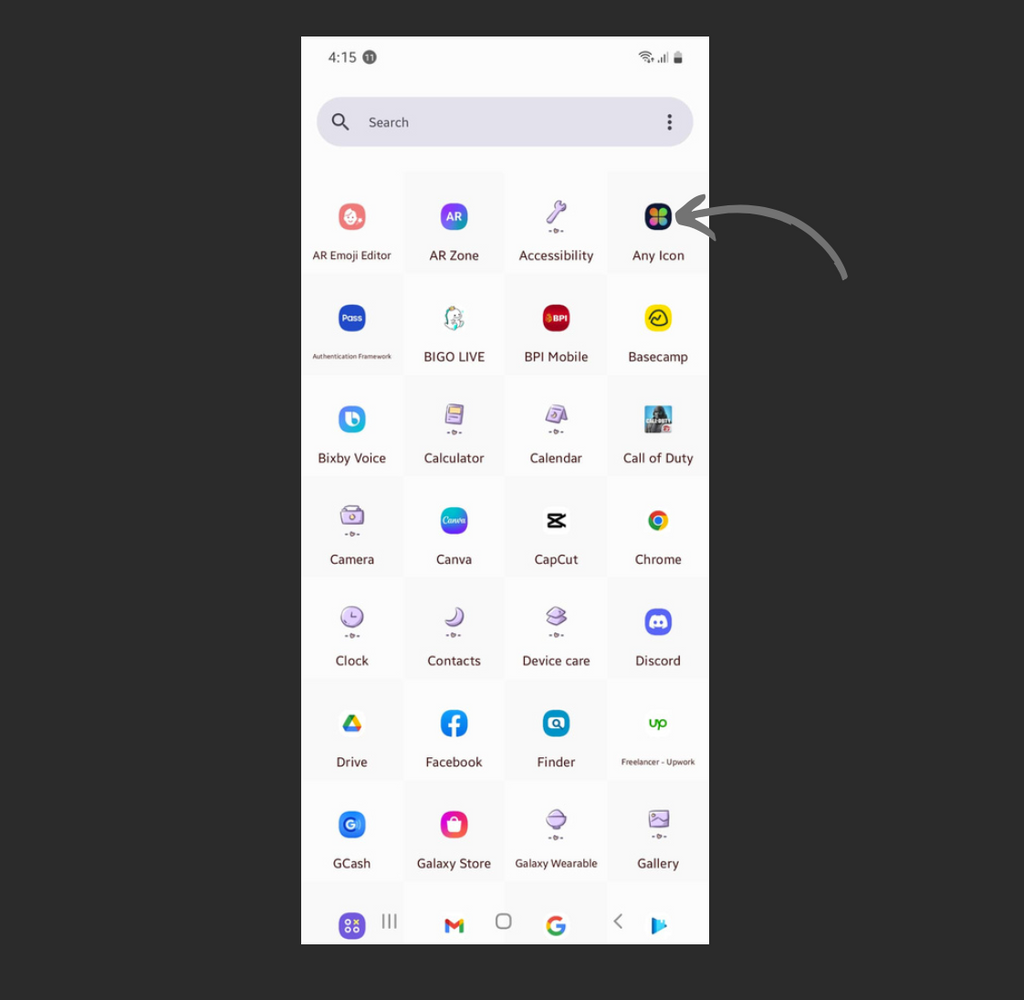
4. Select the Application you want to customize. In this example, we are using the app Instagram 

5. You will see a + sign icon on the left side of the screen. Hit the + sign icon. You can also customize the shape of the icons
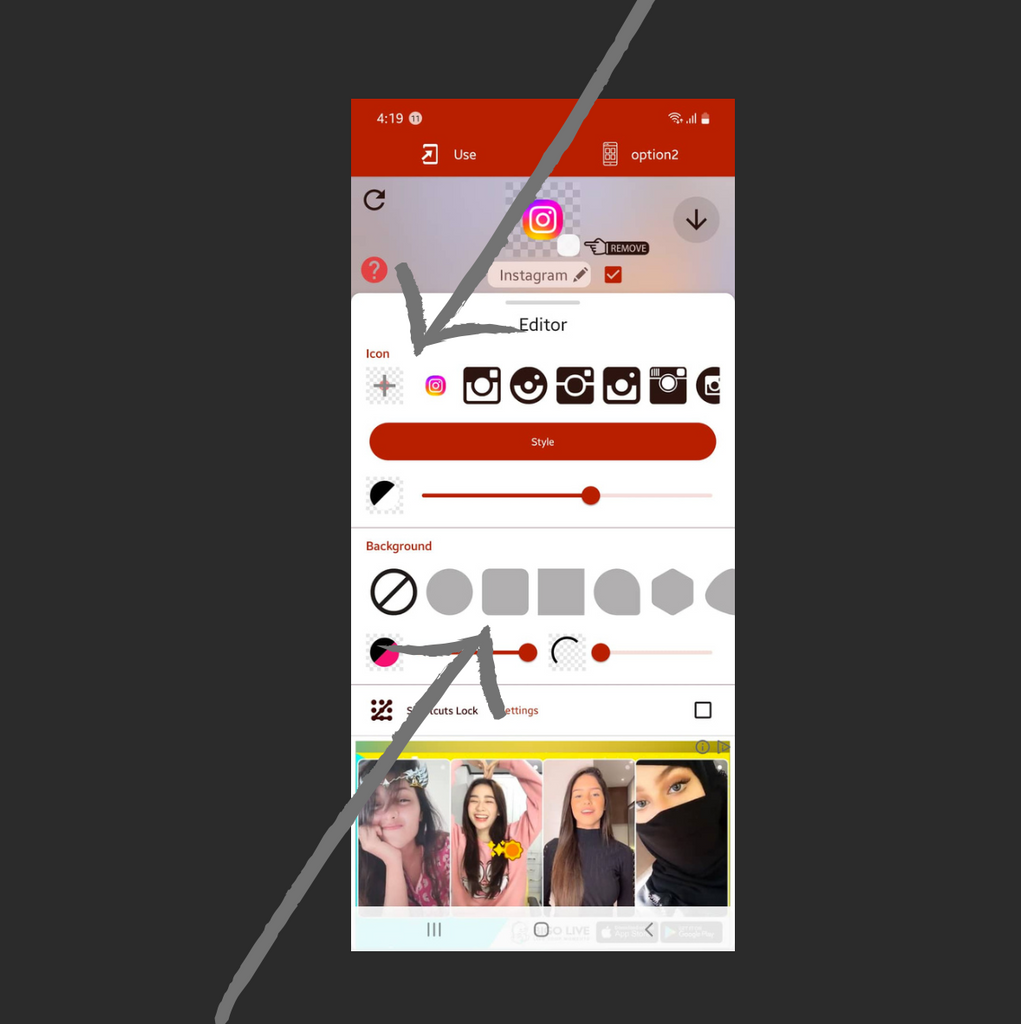
6. Pick the correct image for the application you want to customize.

7. Edit the image the way you prefer (You can put it in left, right, and center, or you can zoom in or out)

8. Finally, hit the “USE” button at the upper right side of the screen.

Repeat the same process to the other applications. Change your wallpaper for aesthetic looks.

Let's move on to the second part of this guide... How to set up Widgets?

Please note we used a third-party app called “Simple Photo Widget”. You can use any photo widget app you like. We are using a simple app for easy-to-use reference.

1. Open the Simple Photo Widget App


2. Click the (+) sign button

*you can watch a video tutorial on how to install different kinds of widget.

3. Hit the Add button


4. Click the edit button to customize the widget

5. Select the "Photos".


5. Choose the widget/images you like and then hit Select.

**You can customize your widget by cropping, rotating, adjust the opacity and border.

6. Hit the create button.

Frequently asked questions

Only if you ignore texture and layering. A well-built all-black outfit with varied fabrics and intentional layering is far more visually interesting than a random mix of colors. Monochrome forces you to think about silhouette, proportion, and material — the fundamentals of great dressing.

Absolutely. Choose lightweight fabrics like linen, thin cotton, or moisture-wicking blends. Loose fits and breathable weaves make all-black summer outfits entirely comfortable. The idea that black "absorbs more heat" is overstated for clothing — fit and fabric weight matter far more than color.

Black is the foundation of most formal dress codes. A black suit, black tie, and black dress shoes is one of the most classic formal looks in existence. For semi-formal events, a black turtleneck under a black blazer is effortlessly sharp.

A core capsule of 10 to 15 pieces can cover virtually every daily situation. Start with the 10 essentials listed above and add specialty items — a swimsuit, workout gear, a formal suit — as needed.

Blvck Paris was founded in 2017 specifically around the all-black lifestyle, offering everything from apparel and accessories to tech products and home goods — all in black. With retail locations in Tokyo, Taipei, Hong Kong, Macau, and Kuwait, and collaborations with brands like CASETiFY, Fortnite, and Warner Bros., it's the only global lifestyle brand built entirely around the color black.

In monochrome dressing, accessories become the accent points. Black watches, matte black jewelry, dark sunglasses, and black leather goods maintain the palette while adding detail. For contrast, gold or silver hardware on bags and belts adds subtle visual interest without breaking the monochrome.