
Blvck Interactive Wallpapers
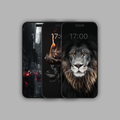
Elevate your device's aesthetics with our collection of interactive Blvck wallpapers. Immerse yourself in a dynamic digital experience that responds to your touch, creating a captivating visual journey every time you unlock your screen. Choose from a diverse array of aesthetics designs to suit your mood and style. Bring the All Blvck Everthing lifestyle to your device.
The resolution of the wallpaper is 1290 pixels by 2796 pixels. 10 available in the set.
Instructions for iOS users:
-
Select Photos: After payment, a link will be sent to your email containing the wallpapers for you to save as photos. Open the Files app (it looks like a blue folder icon) on your iPhone. Your downloaded files may be in the "Downloads" folder, or they could be in iCloud Drive or other locations depending on your settings. Once the zip file 'Interactive Wallpaper' is selected, look for an option to extract or unzip the file. This option might be labeled "Uncompress," "Extract," or "Unzip." Tap on this option.
-
Begin by selecting the two photos you wish to use for your lock screen and home screen.
-
Setting the Lock Screen Wallpaper:
- Open the "Settings" app on your iPhone.
- Scroll down and tap on "Wallpaper".
- Tap on "Choose a New Wallpaper".
- Select "Camera Roll" or "All Photos", depending on where your desired lock screen photo is located.
- Browse and select the photo you want to set as your lock screen wallpaper.
- Adjust the photo if needed by zooming in or out.
- Once satisfied, tap on "Set".
- Choose "Set Lock Screen" to confirm and set the selected photo as your lock screen wallpaper.
-
Setting the Home Screen Wallpaper:
- Follow the same steps as above until you've selected the photo you want to use.
- Instead of tapping "Set Lock Screen", this time tap on "Set Home Screen".
- Confirm your choice, and the selected photo will become your home screen wallpaper.
After completing these steps, you should have different photos set as your lock screen and home screen wallpapers. You can always change them by repeating these steps and selecting new photos.
Instructions for Android users:
-
Select Photos: After payment, a link will be sent to your email containing the wallpapers for you to save as photos. Begin by selecting the two photos you wish to use for your lock screen and home screen.
-
Setting the Lock Screen Wallpaper:
- Open the "Settings" app on your Android device.
- Look for the "Display" or "Wallpaper" option and tap on it.
- Select "Wallpaper" or "Set wallpaper" from the list of options.
- Choose "Lock screen" or "Lock screen wallpaper".
- Select the desired photo from your gallery.
- Adjust the photo if necessary by zooming in or out.
- Once satisfied, tap "Set" or "Apply" to set the selected photo as your lock screen wallpaper.
-
Setting the Home Screen Wallpaper:
- Follow the same steps as above until you reach the wallpaper selection screen.
- This time, choose "Home screen" or "Home screen wallpaper".
- Select the second photo you want to use for your home screen.
- Adjust as needed and tap "Set" or "Apply" to confirm.
After completing these steps, you should have different photos set as your lock screen and home screen wallpapers on your Android device. You can always change them by repeating these steps and selecting new photos.
Details & care
Machine wash cold, inside out. Do not tumble dry. Iron on reverse.
Shipping & returns
Fast Domestic Shipping
Shipments within the US are fulfilled from our warehouses across the USA as soon as your order is verified, it may take up to 72 hours to process and ship your order during business days (Monday - Friday).
We are aiming to have your order dispatched from our facility within 1-3 business days. However, it may take longer particularly during the peak season around year end or sales.
After your order has been shipped, delivery time within the United States is 2-7 business days. Please keep in mind that during holidays or limited edition launches, this time may vary.
For all domestic USA orders, you will receive complimentary Standard Shipping with orders > $150 USD. We offer our standard shipping (2-5 Business Days).
To ensure the best delivery service, we ship using the top carriers (DHL, USPS, UPS).
You will be informed about the expected delivery date during checkout. Please note that shipments are only processed on US business days.
Additionally, we will send you an email the moment your shipment is handed over to shipping provider (typically within 1-3 business days). They will provide you with a tracking number so you can follow your shipment throughout its journey.
Europe Shipping
For customers in Europe, orders are shipped from our European warehouse whenever stock is available. If stock is unavailable, the shipping method at checkout will indicate that duties may be required upon arrival.
International Shipping
Depending on your country, import/customs fees may be applied to your order.
Blvck is not responsible for any shipping deliveries that may be affected by customs, natural occurrences, or air and ground transportation strikes or delays, nor any extra fees, customs or back end charges once the package has exited the United States.
When your tracking number becomes available, you will receive a notification via email to track your order.
Information about customs
All applicable custom fees, taxes and duties are the sole responsibility of the customer. Please note that we are not held liable for any custom fees in your country, hold times or incorrect shipping information provided. Allow 1 to 2 business days of processing your order to receive your tracking number.
Note: If you order multiple items, they may be shipped separately to ensure they get to you as fast as possible. In this case, you will be given individual tracking codes so you know exactly where your order is!
Lost Package
We are not liable for any misplaced or stolen packages. If your tracking number reads as successfully shipped and the address provided to us upon checkout matches the exact address we have shipped your order to, we are not held responsible if your package has been misplaced. Stolen / lost packages are nonrefundable. If you have any questions, please contact us at support@blvck.com and we will try our best to assist you with this matter.
- BWBrody W.Verified BuyerRated 5 out of 5 starsGreat Interactive Wallpapers
really love the lion and rose photos. Great for iPhone. Wish there were iPad versions too!
- SStephanieVerified BuyerRated 5 out of 5 starsBeautiful
I got this specifically for the burning rose. I tweaked it a little just bc i wanted the flames to be more red but it's so damn pretty, I love it(:
- JVJosh V.Verified BuyerRated 5 out of 5 starsInspirational...
I like the aesthetic these wallpapers lend to my phone. It really stands out.
- JLJING LUN H.Verified BuyerRated 5 out of 5 starsGood
Ok
- LNLokesh N.Verified BuyerRated 4 out of 5 starsAwesome
I really like the wallpaper they are unique
